You’ve published the pages, tweaked the headlines, and maybe even built a few links, but your traffic still isn’t moving. Before you spend more time or money, run a free SEO audit tool on your site. Most ranking problems aren’t mysterious. They’re small, fixable mistakes that nobody noticed because nobody looked. Here are the 15 issues that show up again and again.
Table of Contents
Why Every Site Needs a Free SEO Audit Tool
Think of it like a health checkup. You feel fine, so you assume everything’s fine. Then the bloodwork says otherwise. Websites work the same way. A page can look perfect to you and still be invisible to Google because of a stray tag, a slow script, or a broken link three clicks deep.
An audit gives you a clear list of what’s wrong, so you can stop guessing and start fixing.
The 15 Issues Worth Fixing First
1. Missing or Duplicate Title Tags
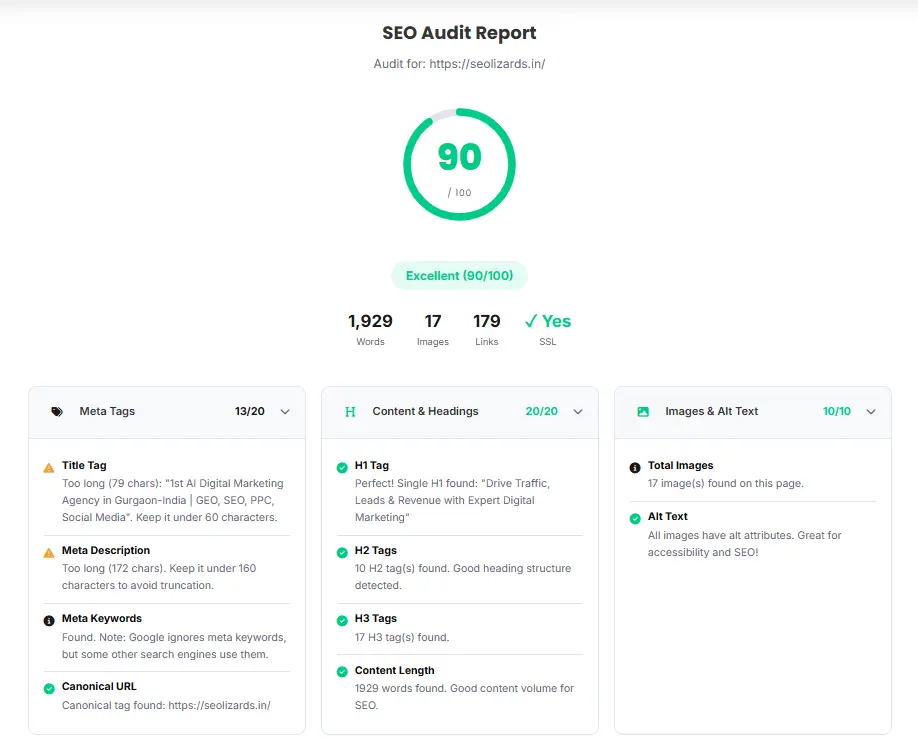
Your title tag is the first thing people see in search results. If it’s missing, too long, or copied across several pages, Google has to guess what each page is about. Give every page its own title, ideally under 60 characters.
2. Weak or Absent Meta Descriptions
Meta descriptions don’t directly boost rankings, but they decide whether someone clicks. Blank ones get replaced with random snippets from your page. Write a short, honest summary for every important page.
3. Broken Links
Dead links frustrate visitors and waste the crawl time search engines give your site. An audit flags every 404 so you can redirect or remove them.
4. Slow Page Speed
If your pages take forever to load, people leave. Large images, bloated scripts, and cheap hosting are the usual suspects. Speed problems are one of the most common things an audit catches.
5. Poor Mobile Experience
Most searches happen on phones. If your text is tiny, buttons are crammed together, or the layout breaks on a small screen, you’re losing rankings and readers.
6. Missing or Messy H1 Tags
Every page should have one clear H1 that says what the page is about. Audits often find pages with none, or pages with three competing ones.
7. Images Without Alt Text
Alt text helps search engines understand your images and helps visually impaired visitors use your site. Missing alt text is easy to fix and easy to forget.
8. Duplicate Content
When the same or nearly the same content lives on multiple URLs, search engines don’t know which version to rank. Canonical tags and consolidation usually solve it.
9. Thin Content
Pages with a couple of lines and nothing useful rarely rank. An audit highlights them so you can expand, merge, or delete them.
10. Poor Internal Linking
Internal links tell Google which pages matter and help visitors find related content. Orphan pages, which have no links pointing to them, are a classic find.
11. Redirect Chains and Loops
One redirect is fine. A page that bounces through four redirects before landing is slow and confusing. Cleaning these up is a quick win.
12. Missing XML Sitemap or Robots.txt Problems
Your sitemap helps search engines find your pages, and your robots.txt file tells them where not to go. A mistake here can quietly block your best content from being indexed.
13. No HTTPS or Mixed Content Warnings
Secure sites are the baseline now. If some resources still load over HTTP, browsers may show warnings that scare people off.
14. Crawl Errors and Indexing Issues
Sometimes pages simply aren’t getting indexed. Audits surface server errors, blocked resources, and stray “noindex” tags that keep pages out of search.
15. Missing Structured Data
Schema markup helps search engines understand your content and can earn rich results like review stars or FAQs. Many sites skip it entirely.
How SeoLizards’ Free SEO Audit Tool Helps
Spotting these problems by hand takes hours, and you’ll probably miss a few. That’s where SeoLizards comes in. Their free SEO audit tool scans your site and shows you what’s holding it back, without making you dig through spreadsheets or decode jargon. You get a clear picture of what’s broken and what to fix first.
And if the report turns up more than you want to handle yourself, the team at SeoLizards can help you turn those findings into real improvements.
Using a Free SEO Audit Tool the Smart Way
Getting the report is only half the job. A few habits make it worth your time:
- Don’t try to fix everything at once. Start with issues that block indexing or crawling, then move to speed and mobile, then the smaller on-page details.
- Re-run the audit after changes. It’s the easiest way to confirm your fixes actually worked.
- Make it routine. Audit once a quarter, or after any big site update, so small problems don’t pile up.
Final Thoughts on Using a Free SEO Audit Tool
You don’t need a huge budget to find out what’s wrong with your website. A free SEO audit tool gives you a roadmap, and fixing even a handful of these 15 issues can make a real difference in how search engines see your site. Run your audit with SeoLizards, tackle the biggest problems first, and check back in a few weeks to see how things have changed.